Remote Agents with HiveMind¶
In a nutshell
OpenVoiceOS runs local-first. Sometimes you want one capable machine to do the thinking while several small devices ("satellites") listen and speak. Or you want to reach your assistant securely from off-device. HiveMind is the companion project that makes this possible. It exposes an OVOS install, or a single persona, over an authenticated, encrypted protocol that satellites and clients connect to.
A separate project, under its own org
HiveMind is maintained in the JarbasHiveMind
GitHub organization (not OpenVoiceOS), with its own
community docs. The OVOS
Maturity Scale, which rates OVOS-org repository health, does not apply to
it. This manual covers only how HiveMind relates to OVOS.
HiveMind has its own documentation site. This manual covers only the OVOS-side integration. See the community docs for HiveMind itself.
HiveMind is the voice-satellite transport: how a mic/speaker device or remote client
reaches an OVOS brain. MCP and A2A (see AI Agents) are different:
LLM/agent tool protocols that let AI systems call each other's tools. The two meet in one
place: hivemind-a2a-agent-plugin lets a HiveMind master send satellite queries to an
A2A agent. See Connect a HiveMind satellite to an A2A agent.
If you are writing a remote or native (non-Python) client that connects over HiveMind, this manual is not the place to look for the wire details. HiveMind defines its own protocol: the connect URL, the access-key auth handshake, the message envelope, and the reconnect/backoff behavior a client must implement. That protocol is documented in the HiveMind community docs.
The pieces¶
| Piece | Role |
|---|---|
hivemind-core |
The server. Listens for connections, authenticates clients, enforces permissions, and routes messages to an agent. |
| Agent | What actually answers: a full ovos-core install (hivemind-ovos-agent-plugin), a single persona (hivemind-persona-agent-plugin), or a remote media renderer (hivemind-player-agent-plugin, which installs as hivemind-player-protocol). |
| Satellites / clients | The devices and apps that connect to hivemind-core (mic satellites, CLI clients, your own code). |
hivemind-core is pluggable via the HiveMind Plugin Manager (HPM) across four axes.
You can swap implementations without touching the rest:
- Agent protocol: what brain answers (OVOS / persona / others).
- Network protocol: how clients connect (WebSocket is the reference implementation).
- Database: where client credentials live (JSON / SQLite / Redis).
- Binary data handler: how binary payloads (e.g. audio) move over the mesh.
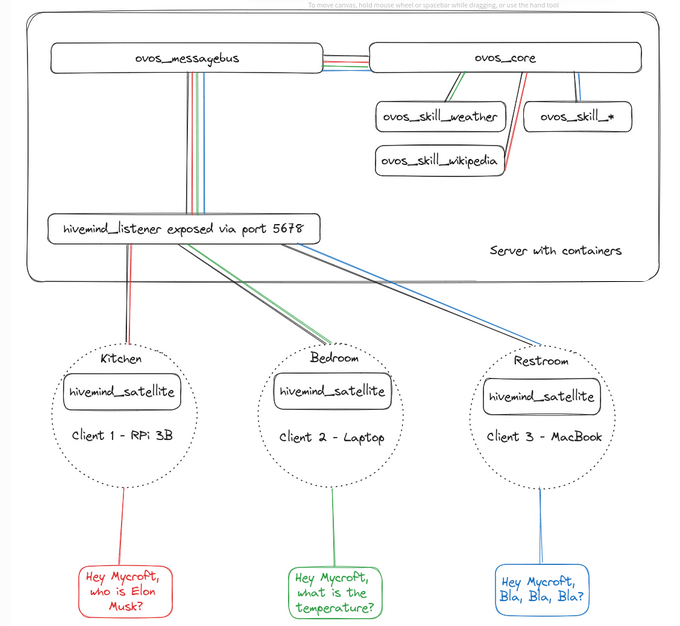
flowchart TD
    Kitchen["Kitchen<br/>satellite"] -- HiveMind protocol --> Listener["hivemind_listener<br/>:5678"]
    Bedroom["Bedroom<br/>satellite"] -- HiveMind protocol --> Listener
    Restroom["Restroom<br/>satellite"] -- HiveMind protocol --> Listener
    Listener --> Core["hivemind-core<br/>(auth + permissions)"]
    Core --> Agent["ovos-core<br/>(hivemind-ovos-<br/>agent-plugin)"]
Diagram: The flow starts at the kitchen, bedroom, and restroom satellites and ends at ovos-core, and all three satellites branch into the shared hivemind_listener before converging through hivemind-core.
Quickstart: expose an OVOS install¶
Alpha channel only
--pre is not optional here. Without it the install resolves the stable release,
which reads its plugins through pkg_resources. Setuptools does not ship
that module, so the first command below fails with ModuleNotFoundError: No module
named 'pkg_resources' and nothing warns at install time.
The satellite is installed with --pre as well, further down. Use the same
form on both: the server and the satellite negotiate a protocol, and
installing one from prereleases and the other without them can pair two
generations that do not speak to each other.
1. Provision a client. Every satellite or client needs an access key issued by the server:
This writes the client to the server's credentials database (under
xdg_data_home()/hivemind-core), separate from the server config at
~/.config/hivemind-core/server.json. The
community docs cover the rest
of the admin CLI.
That command ended in a KeyError naming a database plugin
The server chooses its database backend from configuration, so this message means the machine's configuration selects a backend that is not installed. Install that backend, or set the configured one back to the JSON backend that ships with the server. A fresh install selects the JSON backend and does not raise this.
A new client is allowed nothing until you say otherwise
add-client leaves the client's message-type whitelist empty, and an empty
whitelist denies everything. Administrator status does not exempt a client
from it. The command prints a note saying so; the failure it prevents is a
satellite that authenticates, connects, and is mute.
Grant each type the client needs, one call per type:
The whitelist covers both directions. A satellite sends recognizer_loop:*
and receives speak, speak:b64_audio.response, mycroft.audio.play_sound
and ovos.utterance.handled, so a client granted only what it sends will
talk to the hub and hear nothing back. Messages the hub addresses to one
connection by name bypass the whitelist; the ones a bridge infers from
session ownership, which is how a spoken reply reaches a satellite, do not.
2. Start the server:
This listens on 0.0.0.0:5678 (websocket) on all interfaces. The default config also
declares an HTTP listener on 0.0.0.0:5679, but that one starts only where
hivemind-http-protocol is installed; hivemind-core does not depend on it, so a plain
install binds 5678 alone and logs that the plugin was not found. Firewall whichever ports
are open if the machine faces an untrusted network. Connections still require the
per-client access key and password.
By default it serves the local ovos-core via hivemind-ovos-agent-plugin (configured under
agent_protocol in server.json), over the OVOS messagebus on 127.0.0.1:8181.
Start ovos-messagebus and ovos-core before this step. Without them the server still
accepts pairings and satellites still connect. The failure looks like silence rather than
an error: utterances arrive and nothing answers them.
3. Give a client its identity, then connect. On the client device, save the access key issued in step 1. This step makes everything else work:
pip install --pre hivemind-bus-client   # repo name is hivemind-websocket-client;
# --pre is required: the satellite and the server must speak the same protocol
hivemind-client set-identity --key <access_key> --password <password> --host <hostname-or-ip> --port 5678
Use the access key and password printed by add-client in step 1. set-identity needs at
least one of --key, --password or --siteid. Give --host a bare hostname or IP address, not a URL. The port is stored separately, so a ws://host:port value is accepted without complaint and then builds a malformed address at connect time.
After set-identity, clients (and the solver below) can connect
without being handed connection details each time.
4. Verify the satellite actually connected. Run this on the client after set-identity:
On success it prints:
If it hangs or errors, check that the server is running (hivemind-core listen) and reachable
on the configured host and port. Also check that the access key matches one printed by
hivemind-core add-client.
Choosing the agent: full OVOS, a single persona, or a media renderer¶
The agent is selected by the agent_protocol.module key in ~/.config/hivemind-core/server.json.
Full OVOS: hivemind-ovos-agent-plugin¶
The default. Bridges HiveMind to a running ovos-core over its messagebus. Remote clients get the whole assistant: skills, pipelines, OCP, and more.
A single persona: hivemind-persona-agent-plugin¶
Exposes just one persona, with no ovos-core and no messagebus, so the attack
surface stays minimal. It answers straight from the configured persona.
Pointing the persona at an OpenAI-compatible endpoint, as in the example below, is a working LLM-fallback deployment: the remote node just forwards chat to that endpoint.
{
  "agent_protocol": {
    "module": "hivemind-persona-agent-plugin",
    "hivemind-persona-agent-plugin": {
      "persona": {
        "name": "Llama",
        "solvers": ["ovos-chat-openai-plugin"],
        "ovos-chat-openai-plugin": {
          "api_url": "https://llama.smartgic.io/v1",
          "key": "sk-xxxx",
          "system_prompt": "You are helpful, creative, clever, and very friendly."
        }
      }
    }
  }
}
The persona value may be an inline config dict, as above, or a path to an
ovos-persona JSON file (~ is expanded). The
"module" value must equal the plugin's entry-point name. That same string is reused as the
key holding its config.
A remote media renderer: hivemind-player-agent-plugin¶
Installs as hivemind-player-protocol from the
hivemind-media-player repo, and
registers the hivemind-player-agent-plugin entry point under the hivemind.agent.protocol
group. The package name, the repo name and the plugin id all differ, so
pip install hivemind-player-agent-plugin finds nothing. Set agent_protocol.module to it and the node runs ovos-audio and OCP as a remote
media renderer. Any OCP-speaking client can send it play/pause/seek commands over HiveMind. It
answers no natural-language queries; a natural_language_query yields only the end-of-query
sentinel.
Satellites & clients¶
For a step-by-step build of a server-plus-satellites deployment, see Satellites.
A server is only useful once something connects to it. On the client side:
hivemind-websocket-client: the client library and thehivemind-clientCLI (set-identity, send utterances, and more). It installs ashivemind-bus-client. The repository and the distribution have different names.hivemind-mic-satellite: the thinnest device. Only microphone and VAD run locally. Wake word, STT and TTS all run server-side. Run it with thehivemind-mic-satcommand, and note the server must havehivemind-audio-binary-protocolinstalled (see below).hivemind-audio-binary-protocol: the server-side audio entry point that performs wake word/STT/TTS for audio satellites, with binary audio moving over the mesh. Plainhivemind-coredoes no audio processing without it.
This split is how a voice satellite deployment works: cheap devices listen and speak, and the server thinks.
HiveMind also ships bridges into existing chat and telephony surfaces. Matrix, Mattermost, Telegram, HackChat, and Twitch each have one, and so does VOIP through HiveMind-baresip-bridge. Each bridge is a client like any other, addressing a different end-user surface. The community docs list the integrations.
Session isolation between clients¶
A session_id (see Sessions) names an OVOS-side conversation. HiveMind never
routes on it: a client is addressed by its own connection identity, not by its session. Two
clients may declare the same session_id. The server translates each connection's declared
session_id into its own private identity before the utterance reaches the orchestrator, and
translates it back on the way out. A client sees a stable id, its own name, never another
client's, per
HIVEMIND-BRIDGE-1 §4, "Session fidelity".
HiveMind specifications are cited, not linked
HIVEMIND-BRIDGE-1 lives in the HiveMind architecture repository, which is not
public. Clauses are named here so the behaviour is traceable for anyone who has
access. This is a different specification from OVOS-BRIDGE-1, which covers the
OVOS-side bus bridge and is public; see Bus Bridges.
A non-admin client may also declare OVOS's reserved device-local "default" — it's translated
the same way as any other name, so it stays isolated and never reaches the orchestrator's actual
device-local session. An admin connection is the one exception: it's exempt from
translation, so its declared session_id, "default" included, is stamped onto the OVOS bus
unchanged. Reaching the orchestrator's real sessions by name is what admin standing means here
(HIVEMIND-BRIDGE-1 §4.1, "The reserved default session and the translation exemption").
A client multiplexes several conversations over one connection by declaring a distinct
session_id per message. A chat-room or telephony bridge does this per end-user
conversation. Each declared name maps to its own isolated session. Session contents merge over the established baseline, so a
bridged peer that omits a field keeps its own last value, never the orchestrator's default.
Permissions & access control¶
HiveMind is deny-by-default: a client may only do what it has been explicitly granted,
enforced per message type. The
Security & Permissions community docs
cover the model and the admin CLI. One OVOS-side caveat: the skill/intent blacklist verbs
(blacklist-skill, blacklist-intent, and their allow counterparts) only write client
metadata. Enforcing them requires the OVOSAgentPolicy plugin (from
hivemind-ovos-agent-plugin) in the server's policy chain. The CLI verbs alone block
nothing without it.
This is what makes HiveMind safe to expose to satellites or other users, unlike the plain persona-server, which is HTTP with no auth.
Web admin UI
hivemind-admin-panel is a web UI
for managing clients, permissions, plugins and personas instead of the CLI.
Using HiveMind as a solver¶
Your local assistant can ask a remote HiveMind agent when it's stuck. Install the
ovos-solver-hivemind-plugin
(class HiveMindSolver, import ovos_hivemind_solver) and add it to a persona. It is a normal
solver, so it slots into a mixture-of-solvers chain. This helps when
delegating hard questions or surviving local outages.
{
  "name": "HiveMind Agent",
  "solvers": ["ovos-solver-hivemind-plugin"],
  "ovos-solver-hivemind-plugin": {"autoconnect": true}
}
Or from your own code (the node identity must already be set with hivemind-client set-identity):
from ovos_hivemind_solver import HiveMindSolver

bot = HiveMindSolver()          # reads the identity provisioned via `hivemind-client set-identity`
bot.connect()
print(bot.spoken_answer("what is the speed of light?"))
connect() retries forever if the server is unreachable
If the server is unreachable, connect() blocks: the underlying client's handshake wait
keeps retrying every 5 seconds indefinitely, with no default cap. Wrap the call in your own
timeout/watchdog if that matters. A wrong identity is a different, faster failure: the
client detects the server's auth-rejection close frame and raises ConnectionRefusedError
right away instead of retrying — no timeout needed for that case. hivemind-client
test-identity checks the identity ahead of time either way.
As an intent-pipeline stage¶
There is also a pipeline-plugin form,
ovos-hivemind-pipeline-plugin
(entry point opm.pipeline, class HiveMindPipeline). Instead of living inside a persona, it
slots directly into the intent pipeline. The idea: when in doubt, ask
a smarter OVOS install. Add it to intents.pipeline and configure it under mycroft.conf:
{
  "intents": {
    "pipeline": ["...", "ovos-hivemind-pipeline-plugin", "..."],
    "ovos-hivemind-pipeline-plugin": {
      "name": "Hive Mind",
      "confirmation": true,
      "slave_mode": false
    }
  }
}
Use the solver form to delegate inside a persona's reasoning. Use the pipeline form to delegate at the intent-matching stage, for example as a late, catch-all matcher.
Deployment patterns¶
HiveMind and the persona-server cover different trust boundaries:
| Deployment | Tools | Secure? | Notes |
|---|---|---|---|
| Local interface + persona | ovos-persona-server + persona.json |
❌ | OpenAI-compatible HTTP, no auth, quick setups only |
| Local interface + OpenVoiceOS | ovos-persona-server + the ovos-messagebus handler |
❌ | Exposes the OVOS bus to the persona server; HTTP, no auth |
| Local interface + remote HiveMind agent | ovos-persona-server + ovos-solver-hivemind-plugin |
❌ | HTTP front, but the agent itself is remote |
| Secure remote OpenVoiceOS agent | hivemind-core + hivemind-ovos-agent-plugin + ovos-core |
✅ | Auth, encryption, granular permissions |
| Secure remote persona agent | hivemind-core + hivemind-persona-agent-plugin + persona.json |
✅ | Same, persona-only (minimal surface) |
The HTTP rows are useful for wiring a persona into local tools, such as Home Assistant's Ollama integration or OpenWebUI, on a trusted network. The HiveMind rows are what you expose to satellites or untrusted networks.
⚠️ The plain
persona-serveris HTTP only, not encrypted or authenticated. Keep it on a trusted local network. Use HiveMind for anything remote.
Further reading¶
- HiveMind community docs
- A real use case with OVOS and Hivemind (OVOS blog)
- OVOS & HiveMind in the Manufacturing Industry (OVOS blog)
Read next: Home Assistant Related: Privacy & Security · Persona Server · AI Agents · Production Operations