Architecture Overview¶
In a nutshell
OpenVoiceOS is a voice assistant built from many small, independent parts rather than one big program. Think of it like a team where each member has one job: listening for the wake word, turning speech into text, figuring out what you asked, or answering. They all talk to each other over a shared channel.
Because the parts are separate, you can run only the ones you need, replace any one with a different version, or even spread them across several devices. See the Glossary for unfamiliar terms and the Bus Service for the shared channel they use to talk.
📐 Formal specification
OVOS isn't only an implementation. The contracts between these parts are written down as formal, implementation-agnostic specifications. This page is the friendly tour; for the precise wire formats see the Formal Specifications index, which links every spec in the OpenVoiceOS/architecture repository.
OpenVoiceOS (OVOS) is best understood as a voice operating system, not a
single voice-assistant program. A voice assistant is a product that answers
questions. A voice OS is a platform: it defines the boundary between what you
say and what runs, arbitrates which application handles each utterance, and
carries conversation state across turns. The orchestrator's
match(utterances, lang, session) → Match contract is the stable integration
surface that lets third-party skills and plugins build against OVOS without
knowing about each other. See the
Formal Specifications.
High-Level Flow¶
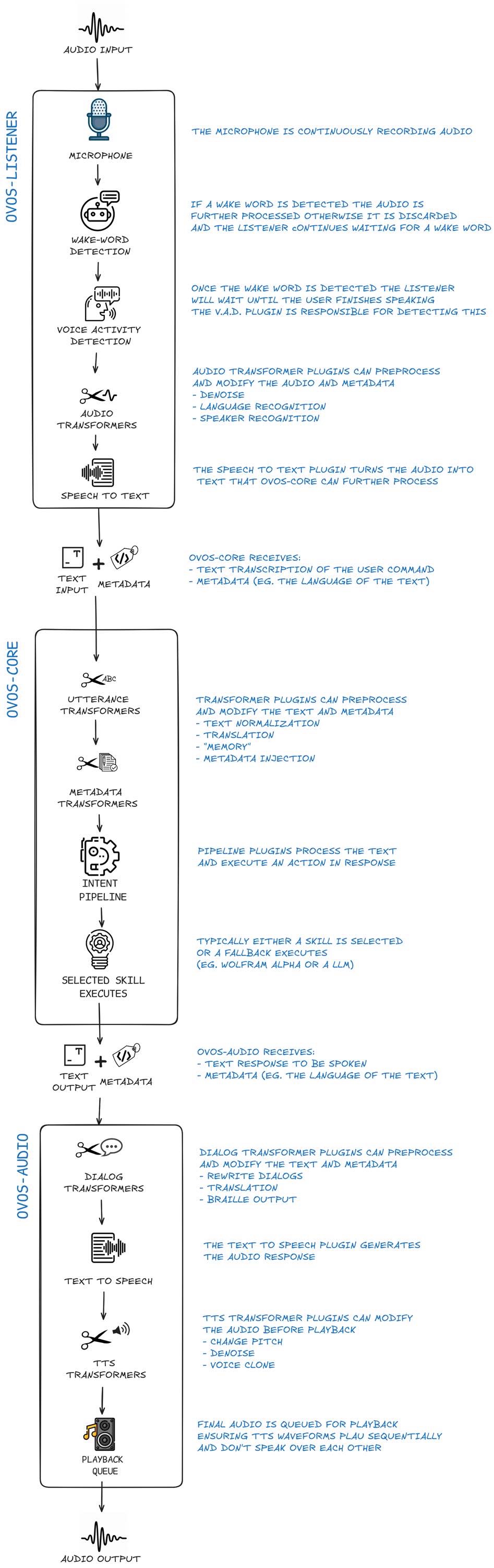
The diagram above illustrates how a user utterance moves through the system:
- Microphone Input: Captured by a microphone plugin.
- Wake-word Detection: The
ovos-dinkum-listener(or similar) monitors the stream for the wake word. - Speech-to-Text (STT): Once the wake word is detected, the subsequent audio is sent to an STT engine.
- messagebus: The transcribed text is published to the bus as
ovos.utterance.handle, the utterance entry point (OVOS-PIPELINE-1 §9.1; legacy namerecognizer_loop:utterance). - Intent Service: the orchestrator (
ovos-core) picks up the utterance and runs it through the pipeline of matcher plugins. The first plugin to claim it wins (OVOS-PIPELINE-1). - Skill Execution: If a match is found, the corresponding skill is triggered.
- Response: The handler emits an
ovos.utterance.speakmessage, the natural-language response (OVOS-PIPELINE-1 §9.6). - Text-to-Speech (TTS):
ovos-audioconverts the response text to audio and plays it.
Component Map¶
flowchart TD
    BUS(["ovos-messagebus<br/>(WebSocket pub/sub)"])
    BUS --- CORE[ovos-core]
    CORE --- SM["SkillManager<br/>loads/unloads skill plugins"]
    CORE --- IS["IntentService<br/>routes utterances through the pipeline"]
    IS --- UTS[UtteranceTransformersService]
    IS --- MTS[MetadataTransformersService]
    IS --- ITS[IntentTransformersService]
    IS --- PP["Pipeline plugins<br/>Adapt, Padatious, Converse, Fallback, …"]
    CORE --- SS["SkillsStore<br/>runtime pip install/uninstall"]
    CORE --- ES["EventScheduler<br/>timed bus events"]
    BUS --- LISTENER["ovos-dinkum-listener<br/>STT / wake word → ovos.utterance.handle"]
    BUS --- AUDIO["ovos-audio<br/>TTS / sound playback (+ legacy media audioservice)"]
    BUS --- MEDIA["ovos-media<br/>standalone media-playback (opt-in, PoC)"]
    BUS --- GUI["ovos-gui<br/>GUI layer"]
    BUS --- PHAL["ovos-phal<br/>hardware/platform plugins"]
Diagram: the messagebus sits at the center, with ovos-core (and its SkillManager, IntentService, transformer chains, and pipeline plugins), ovos-dinkum-listener, ovos-audio, ovos-media, ovos-gui, and ovos-phal each connected to it as independent clients. Note that ovos-media is an opt-in proof of concept, not a default component — see its page for the full status warning.
ovos-messagebus is the hub; every other box is a client connected to it, not a node in a
hierarchy. Besides ovos-core, five services — the listener, audio, media, GUI, and PHAL — are
separate processes and could in principle run on separate machines, each responsible for one
stage of the utterance lifecycle.
The seven transformer stages don't all run in the same place:
| Chain | Runs in |
|---|---|
| Utterance | ovos-core (IntentService) |
| Metadata | ovos-core (IntentService) |
| Intent | ovos-core (IntentService) |
| Typed slots | ovos-core (IntentService) |
| Audio | ovos-dinkum-listener, before STT |
| Dialog | ovos-audio (or ovos-media, where installed) |
| TTS | ovos-audio (or ovos-media, where installed) |
Key Services¶
messagebus¶
The backbone of OVOS. All components communicate via this WebSocket-based bus. It ensures loose coupling and enables remote control and multi-device setups.
ovos-core¶
The "brain" of the system. It manages the lifecycle of skills and coordinates intent matching through a multi-stage pipeline. In the formal model it is the orchestrator: the role that runs the pipeline of matcher plugins, dispatches the winning match to a handler on <skill_id>:<intent_name>, and emits the handler-lifecycle events (OVOS-PIPELINE-1).
Speech Service¶
Handles audio capture, wake-word detection, and STT. It is responsible for turning "sound" into "data".
Audio Service¶
The output layer. It manages TTS generation and audio playback, ensuring that only one thing is speaking at a time and handling audio focus.
GUI Service¶
Provides a visual interface for skills. It uses a specialized protocol to push QML-based or HTML-based views to a screen.
⚠️ The current ("legacy") GUI Service is deprecated. There is no generally usable OVOS GUI, and a replacement is in progress. On Mark 2, the ovos-installer keeps the legacy GUI running in the meantime.
PHAL (Platform & Hardware Abstraction Layer)¶
Handles hardware-specific tasks like volume control, battery monitoring, and connectivity management.
Modularity and Plugins¶
One of OVOS's greatest strengths is its plugin-based architecture. Almost every major function is a plugin, and the manual keeps a maintained catalog for each category:
- Microphone Plugins: see the Microphone Plugins catalog.
- STT Plugins: see the STT Plugins catalog.
- TTS Plugins: see the TTS Plugins catalog.
- Wake-word Plugins: see the Wake-word Plugins catalog.
- Intent Plugins: Adapt, Padatious, Common Query, and the rest of the pipeline overview.
This allows OVOS to run on everything from a high-end server to a Raspberry Pi Zero.
Further reading¶
Source code: OpenVoiceOS/ovos-core.
Read next: Life of an Utterance · MessageBus Service Related: Formal Specifications · Plugin Manager · ovos-core Overview · Composable Deployments