PHAL — Platform/Hardware Abstraction Layer
Maturity — Stable ⬤⬤⬤⬤◯
Established and production-ready, actively maintained. Rated by repository health, not version.
In a nutshell
PHAL is how OpenVoiceOS talks to the physical device it runs on: things like volume controls, Wi-Fi setup, buttons, LEDs, and other hardware. It works through small add-ons (plugins) that each handle one piece of hardware and quietly run in the background, so the assistant can adjust the speaker volume or set up a network connection without you saying a word. Some hardware needs extra system permissions, so PHAL comes in a regular version and a privileged "admin" version. If you're building your own hardware and want to write a PHAL plugin for it, see Building Hardware on OVOS. New to the terms? See the Glossary.
PHAL (Platform/Hardware Abstraction Layer) provides a plugin-based system for integrating hardware-specific and platform-level functionality into OVOS. PHAL plugins run as independent services alongside the core voice assistant, receive the OVOS messagebus client at construction, and may listen to or emit any bus event.
Technical Reference
-
PHAL.start()(ovos_PHAL/service.py:107): loads user-level plugins and reportsProcessStatusready.PHALis a plain object, not a thread. -
AdminPHAL.load_plugins()(ovos_PHAL/admin.py:45): discovery/validation for privileged/root-level plugins (find_admin_plugins). -
PHAL.load_plugins()(ovos_PHAL/service.py:77): discovery and validation of user plugins via OPM (find_phal_plugins).
Overview
Two services are provided. Each discovers plugins from its own OPM entry-point group
and is launched by its own console script (ovos_PHAL / ovos_PHAL_admin):
| Service | OPM group | Console script | Config section | Default enable | Privilege |
|---|---|---|---|---|---|
PHAL |
opm.phal |
ovos_PHAL |
mycroft.conf["PHAL"] |
Auto (validator + not enabled: false) |
Current user |
AdminPHAL |
opm.phal.admin |
ovos_PHAL_admin |
mycroft.conf["PHAL"]["admin"] |
Opt-in ("enabled": true required) |
Root / privileged |
┌──────────────────────────────────────────────────────┐
│  ovos-core  /  ovos-audio  /  skills                 │
│           (OVOS MessageBus)                          │
└──────────────┬───────────────────────────────────────┘
               │
      ┌────────┴─────────────────────────────────────┐
      │  PHAL  (user-space)                          │
      │    ovos-PHAL-plugin-alsa                     │
      │    ovos-PHAL-plugin-network-manager          │
      │    …                                         │
      └────────────────────────────────────────────┬─┘
                                                   │
                                           ┌───────┴───────┐
                                           │  AdminPHAL    │
                                           │  (root)       │
                                           │  plugin-system│
                                           └───────────────┘
Building your own PHAL plugin?
See Writing PHAL Plugins.
PHAL Service
Module: ovos_PHAL.service.PHAL
from ovos_PHAL import PHAL

phal = PHAL(
    config=None,      # dict from mycroft.conf["PHAL"], or None to auto-read
    bus=None,         # MessageBusClient; created automatically if None
    skill_id="PHAL",
    on_ready=...,
    on_error=...,
    on_stopping=...,
    on_started=...,
    on_alive=...,
    watchdog=lambda: None
)
phal.start()     # load_plugins(), set ProcessStatus to ready
phal.shutdown()  # set ProcessStatus to stopping
Plugin loading rules
load_plugins() iterates over all plugins discovered via find_phal_plugins() (entry
point group opm.phal) and applies these rules in order:
-
Admin-only check: if the plugin name appears in
admin_config, skip it (it will be loaded byAdminPHALinstead). -
Explicit disable: if
config.get("enabled") is False, skip. -
Validator: if the plugin class has a
validatorattribute, callplug.validator.validate(config):- Returns
True→ load - Returns
False→ silently skip (hardware not present) - Raises exception → skip, log error
- Returns
-
No validator: defaults to enabled. Only
enabled: falsecan disable. Note: thePHALPluginbase setsvalidator = PHALValidatorby default, so most plugins do take the validator path. The default validator just returnsconfig.get("enabled", True) is True. A subclass overridesvalidate()to add a real hardware probe. -
Instantiation:
plug(bus=self.bus, config=config), stored inself.drivers[name].
ProcessStatus lifecycle
start() and shutdown() drive a ProcessStatus object (ovos-utils) that other
services can query over the bus:
| State | When |
|---|---|
started |
start() called (set_started()) |
ready |
load_plugins() returned without raising (set_ready()) |
error |
Exception during load_plugins() (set_error()) |
stopping |
shutdown() called (set_stopping()) |
The alive callback exists in the hook map but PHAL.start() does not call
set_alive(). The status goes straight to started then ready.
Plugin installs over the bus
The service runs its own ServiceInstaller (service name ovos_PHAL, or
ovos_PHAL_admin for AdminPHAL), so PHAL plugins can be pip-installed into the PHAL
process's own environment over the bus. Gated by skills.installer.allow_pip (off by
default). See Skill Installer for the topics and the other services
that do this.
Configuration
{
  "PHAL": {
    "ovos-PHAL-plugin-alsa": {},
    "ovos-PHAL-plugin-dotstar": {
      "enabled": true
    },
    "ovos-PHAL-plugin-connectivity-events": {
      "enabled": false
    }
  }
}
| Config key | Effect |
|---|---|
"enabled": false |
Explicitly disable this plugin (skipped before the validator runs) |
"enabled": true |
Passed to the validator. The default validator treats it as enabled, but a custom validate() can still skip on missing hardware |
| Any other keys | Passed as config to the plugin constructor |
Plugins with a passing validator and no enabled: false are loaded automatically.
No config entry is needed just to enable a plugin.
AdminPHAL Service
Module: ovos_PHAL.admin.AdminPHAL
A subclass of PHAL that loads admin-privilege plugins. Run as root or with the
hardware capabilities required by its plugins.
from ovos_PHAL import AdminPHAL

admin = AdminPHAL(
    config=None,
    bus=None,
    skill_id="PHAL.admin",
    # same on_ready / on_error / on_stopping / on_started / on_alive / watchdog
    # hooks as PHAL above
)
# Run it via its systemd unit, not casually/interactively as root, and confirm the
# bus is bound to localhost (see bus-service.md) before enabling any admin plugin: this
# is a root, bus-reachable process, and the bus itself is unauthenticated.
sudo ovos_PHAL_admin
Key differences from PHAL
PHAL (user) |
AdminPHAL (admin) |
|
|---|---|---|
| Entry point group | opm.phal |
opm.phal.admin |
| Config section | PHAL |
PHAL.admin |
| Default enable | Yes (validator + not enabled: false) |
No, requires "enabled": true |
| Skip logic | Skips plugins in admin_config |
Skips plugins in user_config |
Security model
Admin plugins are intended for hardware requiring elevated permissions: I²C, SPI, GPIO,
system power management, thermal control. The explicit enabled: true requirement is a
security boundary. Installed-but-unconfigured admin plugins never run accidentally.
Skills and the core pipeline never run as root.
AdminPHAL plugins run enabled bus actions with root privilege
AdminPHAL receives the same unauthenticated messagebus client
as every other service. Construction takes a plain MessageBusClient, with no
separate credential or capability check. If the bus is reachable, anyone who can emit
bus messages can trigger any enabled admin plugin's actions, and those actions run
with root privilege: for example, ovos-PHAL-plugin-system exposes reboot, shutdown
and factory-reset over the bus. This is a stronger consequence of the bus's lack of
authentication than "skills aren't sandboxed." It is root-equivalent remote control,
not just assistant control. See Privacy & Security for the full
trust-boundary picture.
Configuration
{
  "PHAL": {
    "admin": {
      "ovos-PHAL-plugin-system": {
        "enabled": true,
        "use_external_factory_reset": true
      }
    }
  }
}
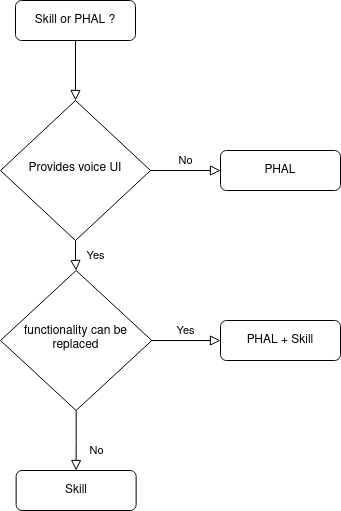
Choosing Between PHAL and a Skill
| Use PHAL when… | Use a Skill when… |
|---|---|
| Low-level system or hardware integration | Voice interactions and user-facing features |
| No voice trigger needed, reacts to hardware events | Responds to user utterances |
| Needs to run at startup regardless of voice activity | Should only activate when invoked |
Requires root (AdminPHAL) |
Always runs unprivileged |
In some cases both are appropriate: a PHAL plugin for backend hardware support and a skill as a voice frontend.
Available Plugins
| Plugin | Description |
|---|---|
| ovos-PHAL-plugin-alsa | Controls system volume with ALSA |
| ovos-PHAL-plugin-pulseaudio | Controls system volume with PulseAudio |
| ovos-PHAL-plugin-system | Reboot, shutdown, factory reset, and other system commands (admin) |
| ovos-PHAL-plugin-mk1 | Mycroft Mark 1 hardware integration |
| ovos-PHAL-plugin-mk2-v6-fan-control | Fan control for the Mycroft Mark 2 dev kit. The pip package is ovos-PHAL-plugin-mk2-fan-control (no v6) |
| ovos-PHAL-plugin-dotstar | Dotstar/APA102 LED ring driver for Respeaker mic HATs and the Adafruit Voice Bonnet |
| ovos-PHAL-plugin-respeaker-2mic | ReSpeaker 2-mic HAT support. Warning: archived, not on PyPI |
| ovos-PHAL-plugin-respeaker-4mic | ReSpeaker 4-mic HAT support. Warning: archived, not on PyPI |
| ovos-PHAL-plugin-wifi-setup | Central Wi-Fi setup. Warning: archived, deprecated. See ovos-PHAL-plugin-network-manager |
| ovos-PHAL-plugin-gui-network-client | GUI-based Wi-Fi setup. Warning: archived, deprecated. See ovos-PHAL-plugin-network-manager |
| ovos-PHAL-plugin-balena-wifi | Wi-Fi hotspot setup. Warning: archived, deprecated. See ovos-PHAL-plugin-network-manager |
| ovos-PHAL-plugin-network-manager | Provides the network manager interface for NetworkManager-based plugins |
| ovos-PHAL-plugin-connectivity-events | Reports network connectivity changes to the messagebus |
| ovos-PHAL-plugin-ipgeo | Autoconfigure default location based on IP address via ip-api.com |
| ovos-PHAL-plugin-gpsd | Provides GPS location to OVOS via gpsd. Warning: the released version imports a MycroftUserConfig symbol that ovos-utils does not provide, so it fails to load. A fix is in an open pull request on the plugin repository. |
| ovos-PHAL-plugin-camera | Interact with cameras using OpenCV or libcamera: snapshots, video streams over HTTP, and messagebus control |
| ovos-PHAL-plugin-wallpaper-manager | Central wallpaper management interface for homescreens and other desktops |
| ovos-PHAL-plugin-oauth | Handles OAuth authentication flows for OVOS skills and services |
| ovos-PHAL-plugin-hotkeys | Keyboard hotkeys: define key combos to trigger bus events |
| ovos-PHAL-sensors | Exposes the OVOS device and its sensors to Home Assistant |
Read next: Writing PHAL Plugins · Concepts Overview · Hardware Integrators Related: Security & Trust Model · MessageBus Service · Mark 2